


Docker storage enables storage administrators to configure and support application data storage within Docker container deployments.
Docker is one of the most transformative and disruptive technologies to appear in recent years. It impacts multiple facets of IT, including storage. The technology represents a different approach than either traditional bare metal or virtual machine (VM) application delivery, providing organizations with the opportunity to benefit from a more agile and cloud-native approach.
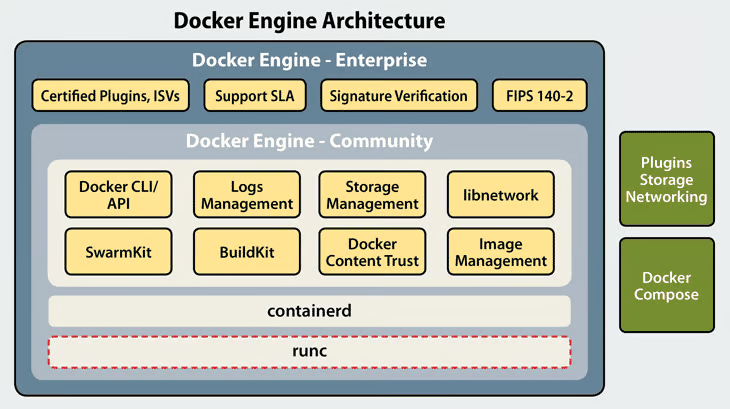
The Docker Engine runs containers, which enable the efficient and flexible delivery of applications and services.
What is Docker?
Docker is both the name of a company (Docker Inc.) and its eponymous container engine (the Docker Engine) that is often simply just referred to as Docker.
In contrast with a hypervisor-based VM model, the Docker Engine enables an isolated application execution layer on top of an existing operating system. In the hypervisor model, the VM needs to have an entire operating system, which makes it a bulkier and less agile approach to application delivery than the Docker Engine’s container model.
The Docker Engine runs containers, which enable the delivery of the applications and services that an organization wants to run. A docker container can run a whole application, or an individual component of an application or service, in an approach commonly referred to today as microservices.
There are several key elements that are part of containers, including docker images and dockerfiles.
- Docker image is a file that includes all the component layers that are used to execute code within the container
- Dockerfile is a simple text document that includes all of the command that can be used to assemble a given docker image.
Docker, as a product, is available in both a Community Edition (CE) as well as an Enterprise (EE). The Docker CE release includes the core Docker Engine, while Docker Enterprise provides additional capabilities for container management and deployment at scale.
How does Docker Architecture Enables Storage?
Docker in 2019 is not the same architecture as it was when the Docker Engine was first created. Originally the Docker Engine was a container runtime and also integrated the other required elements, including networking and storage.
In 2016, Docker, Inc began the process of disaggregating Docker, breaking out the core runtime, in an effort known as containerd, which is now a project that is hosted by the Cloud Native Computing Foundation (CNCF). The modern Docker Engine now utilizes containerd as its core runtime.
On top of containerd are a set of additional software libraries for handling other container functions. This libraries include libnetwork for networking and swarmkit for cluster orchestration and storage management capabilities.
Docker Storage: Multiple Methods
Unlike a traditional bare metal application where storage is simply a device target, or a VM where storage is often attached directly to an image, there are multiple ways to handle storage for docker containers.
The docker image itself typically includes a writable layer, though that is only useful for stateless, non-persistent data and is not suitable for data storage or stateful persistent application data needs. Containers are often mounted and then destroyed at a rapid rapid for scalability purposes, making persistent storage within the same container that an application is running an unlikely proposition.
For persistent data storage in docker there are two key options:
- Data Volume. A volume is an area of isolated storage on the host system on which a Docker Engine is running, that is also managed by Docker.
- Bind Mounts. With a bind mount, data can be stored on any attached storage area or device that is connected to the host system.
Docker can also be used as part of a Kubernetes deployment, in which case it can inherit the basic storage features provided by that platform. Kubernetes is a container orchestration platform and uses the Container Storage Interface (CSI) as a primary mechanism for connecting storage devices.
| Advantages | Disadvantages | |
|---|---|---|
| Volume | Full control over storage | Storage space needs to be allocated to Docker. |
| Bind Mounts | Storage availability Scalability | Allows access to sensitive file from the host operating system Less functionality than Volumes |