


DIMM stands for Dual In-Line Memory Module, a type of computer memory that installs in the motherboard’s memory slots. While DIMM’s predecessor, SIMM (Single In-Line Memory Module), are 32-bit and must be installed in matched pairs to achieve 64-bit data paths, DIMMs are natively 64 bits. This enables a single DIMM to transfer data twice as fast as a single SIMM.
DIMM memory chips are dynamic random access memory (DRAM), the most common type of primary memory. Static RAM is more expensive and faster and creates the CPU’s cache memory layer. DRAM consists of a transistor and capacitor that create a memory cell, which represents a single bit. The DIMM is installed on a motherboard and stores each data bit in separate memory cells.
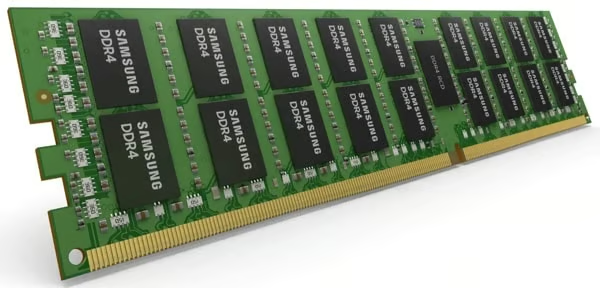
While earlier DIMM units held a paltry 512 MB of RAM, modern DIMM units like this Samsung DDR4 hold up to 64GB RAM.
DIMM Architecture
DIMM is a printed circuit board with mounted DRAM or SDRAM integrated circuits. SDRAM is Synchronous DRAM that runs at significantly higher clock speeds.
- Cooling. As DIMM chip density increased to improve performance, higher clock speeds generated more heat. 8GB or 16GB chips were not a major heat source. But with chip density reaching 64GB double that on the horizon, reducing heat became critical. Manufacturers developed heat reduction technologies to minimize heat from DIMS, including cooling fins that vented excess heat from the motherboard into the computer enclosure.
- Memory Ranks. Modern DIMMs house independent sets of DRAM chips called memory ranks. Ranks open multiple DRAM pages, which for some applications results in performance gains. Multiple ranks connect to the same address and bus to create denser memory for the processor. Although the processor cannot simultaneously access all available ranks for the same operation, interleaving allows the processor to simultaneously use multiple ranks for different operations, such as writing to one rank and reading from another. Once an operation is complete, DRAM flushes the data. Too many ranks in a single channel can cause pipeline stalls.
- Channel Memory. Single-channel memory is the minimum bandwidth for DIMMs to communicate with the processor. Dual-channel memory is two 64-bit channels, triple-channel is xx, quad-channel is xx: and so on through 6- and 8-channel memory. Multi-channel memory is not a DIMM-specific technology: motherboards are manufactured to support specific numbers of channels and DIMM slots.
- SDR SDRAM. First-generation Single Data Rate SDRAM entered the market in the mid-1960s. DRAM is asynchronous, which means that it can only respond to changes in control inputs from the CPU’s system bus. Speed is measured in nanoseconds. SDRAM accelerates DRAM speeds because it synchronizes with CPU clock timing. Instead of waiting until a control input is executed, SDR SDRAM activates earlier, reading a single word of data at the rising edge (start) of the new input’s clock cycle. Or it will be read at the falling edge (end) of the previous input’s cycle. Speed is measured in megahertz (MHz). The memory controller determines the exact time that the data will be ready for processing, so there is no delay due to the CPU waiting between memory accesses. Although it is faster than DRAM, SDR SDRAM can only read/write a single piece of data within a clock cycle.
- DDR SDRAM. DDR means Double Data Rate, which can read at two words of data per clock cycle. DDR SDRAM was the first generation of DDR. Instead of waiting until the previous command has cleared the external data bus, DDR is able to transfer data at both the rising edge and falling edge of the clock cycle. This enables DDR to effectively doubling the transfer rate over SDR’s transfer speeds. Since manufacturers made changes to the interface timing and reduced the voltage to the DIMM, DDR SDRAM is not backwardly compatible with DSR SDRAM.
- DDR Generations. There are now four released generations of DDR in the marketplace: DDR, DDR2, DDR3 and DDR4. DDR2’s prefetch buffer is 4 bits, which doubled the first generation’s buffer and whose transfer rate is considerably faster. DDR3 improves performance at 40% power reduction and adds additional features. DDR4, the latest commercial generation, lowers the operating voltage, increases the transfer rate and adds performance enhancements and data integrity functions.
- DDR5. The JEDEC standards organization published specs for DDR5 in 2018, and several manufacturers have announced that they will release commercial DDR5 by the end of 2019. DDR5 will double DDR4’s top data transfer rates of 25GB/s and will consume less power than DDR4. However, DDR5 is not the only type of DIMM development on the horizon. JEDEC is also working on new standards for non-volatile DIMM (NVDIMM), which would retain data during a power outage. NVDIMM creates a single non-volatile memory subsystem using non-volatile NAND, DRAM, and dedicated backup power.
DIMM’s Predecessor: SIMM
A SIMM (single in-line memory module) is DIMM’s predecessor. SIMM contains DRAM or SDRAM chips on a printed circuit board. One SIMM has a 32-bit data path; paired identical SIMMs support 64-bit data paths in modern computers.
SIMM vs. DIMM
See Full Table
| Component | SIMM | DIMM |
|---|---|---|
| Pins/Electrical connectors | The two sides of the connectors are identical | Separate electrical connectors on both sides |
| Data path size | 32-bit data path in a single card; requires identical pairs to support 64-bit buses | Single DIMM supports 64-bit data path; multi-channels require that users install DIMM in pairs |
| Efficiency | Paired SIMMs increase the bus size but increase overhead, since the processor accesses the memory cards in parallel | No overhead from parallel memory processing |
| Pins | 72 pins | Most common is 168; supports combinations between 100 and 240 |
| Size | Typical size is 4.25” long and 1” wide | Depending on the pin configuration, ranges between 1.67-5.25” long and 1-1.75” wide |
| Usage | Deployed on early Pentium and Intel computer systems | Today’s memory module standard; development concentrates on faster chips and improved management intelligence |
x
SIMM vs. DIMM
| Component | SIMM | DIMM |
|---|---|---|
| Pins/Electrical connectors | The two sides of the connectors are identical | Separate electrical connectors on both sides |
| Data path size | 32-bit data path in a single card; requires identical pairs to support 64-bit buses | Single DIMM supports 64-bit data path; multi-channels require that users install DIMM in pairs |
| Efficiency | Paired SIMMs increase the bus size but increase overhead, since the processor accesses the memory cards in parallel | No overhead from parallel memory processing |
| Pins | 72 pins | Most common is 168; supports combinations between 100 and 240 |
| Size | Typical size is 4.25” long and 1” wide | Depending on the pin configuration, ranges between 1.67-5.25” long and 1-1.75” wide |
| Usage | Deployed on early Pentium and Intel computer systems | Today’s memory module standard; development concentrates on faster chips and improved management intelligence |
The Question of DIMM Slots
The ideal number and type of DIMM slots differs according to physical computer sizes and use cases.
Computer motherboards support either 2, 4, 6 or 8 DIMMs. Most motherboards are manufactured with 4 slots. Smaller motherboards may have 2; high-end motherboards with fast chipsets will have 8.
The most common types of DIMM memory chips are DDR4-SDRAM for high-end servers, DDR2- or DDR3-SDRAM for desktops, and SO-DIMM for laptops. SO-DIMM is Small Outline RAM manufactured for laptop motherboards.
Advantages of DIMM
- Separate contacts on each side of the board doubles the size of the data path over SIMMs with their redundant contacts.
- Buffers control signals and command addresses from the CPU, which reduces the size of memory workloads.
- Dual-channel architecture enables 128-bit memory data bus, and the CPU can separately access memory on each DIMM.
- Triple- and quad-channels are also available, and a few high-end servers use 6- and 8-channel memory modules.
There are factors in computing performance greater than the width of the data bus, so multi-channel multipliers do not automatically correspond to performance gains. However, memory technologies like interleaving reduces memory latency in multi-channel DIMMs. Interleaving spreads data in alternating patterns across memory modules. The CPU sequentially accesses data patterns across memory modules, instead of waiting to fill one module before accessing the next one.