Solid State Drives (SSDs) come in a number of different form factors and are available with different interface connects. A PCIe SSD is an SSD storage device that is connected to a computing system via a PCIe interface. Similarly, SATA is another common interface in computing system for storage and peripheral connectivity. In the debate […]
Solid State Drives (SSDs) come in a number of different form factors and are available with different interface connects. A PCIe SSD is an SSD storage device that is connected to a computing system via a PCIe interface. Similarly, SATA is another common interface in computing system for storage and peripheral connectivity.
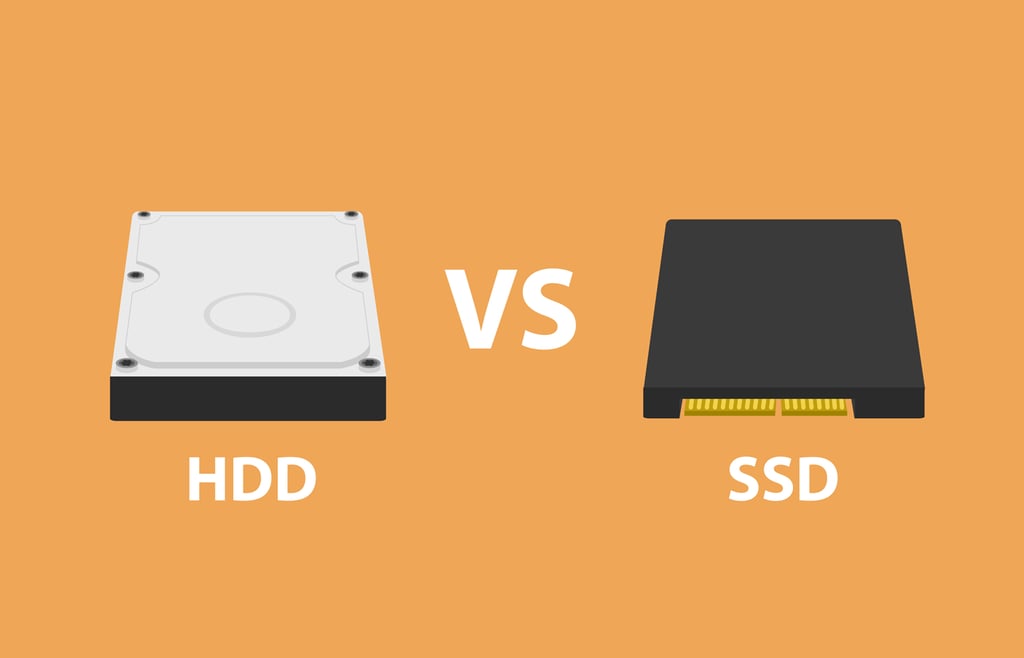
In the debate between SSD vs HDD, the benefits of SSDs of spinning disk hard disk drives (HDDs) are well understood, with significant performance gains for read and write speeds. Perhaps less well understood is the difference between interfaces used to connect SSDs, which is what this Enterprise Storage Forum guide is all about.
Note, also, that among the best SSDs on the market, you’ll find both PCIe and SATA. Either interface might be the best, depending on your needs. Let’s go in-depth.
Jump to:
PCIe is an acronym for Peripheral Component Interconnect Express and is sometimes referred to as PCI Express. PCIe is an interface that can be used to connect any number of different things, including graphics cards and storage devices. There are several generation of PCIe standards, with SSDs typically supported and running PCIe version 3.0. And some are starting to support the newer PCIe 4.0 specification.
Another important attribute of the PCIe interface are the different slot sizes, which provide varying amounts of system bandwidth. The slot interface size in tandem with the PCIe version number help to determine the total bandwidth. PCIe interfaces are available in different sizes, including: x4, x8 and x16.
A PCIe 3.0 X16 interface slot for example offers a total bandwidth of 16 Gb/s while a PCIe 2.0 X16 slot provide 8 Gb/s.
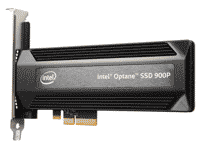
This high performance Intel SSD uses an PCIe interface.
PCI Speed Comparison:
| PCIe 2.0 | PCIe 3.0 | |
|---|---|---|
| x2 | 1 Gb/s | 2 Gb/s |
| x4 | 2 Gb/s | 4 Gb/s |
| x8 | 4 Gb/s | 8 Gb/s |
| x16 | 8 Gb/s | 16 Gb/s |
| PCIe 2.0 | PCIe 3.0 | |
|---|---|---|
| x2 | 1 Gb/s | 2 Gb/s |
| x4 | 2 Gb/s | 4 Gb/s |
| x8 | 4 Gb/s | 8 Gb/s |
| x16 | 8 Gb/s | 16 Gb/s |
There are also different types of PCIe SSD that support different standards, including M.2. An M.2 PCIe SSD can make use of the NVMe (Non-Volatile Memory Express) specification to provide additional speed and performance benefits. U.2 is another option for PCIe SDD, which provide PCIe connectivity in a form factor that fits into 2.5 and 3 inch enclosure.
SATA, or Serial Advanced Technology Attachment, is often used interface in computing system for storage and peripheral connectivity. SATA can be used to connect optical drives including BluRay as well as spinning disk hard drives (HDD) and SSDs.
There have been multiple iterations of the SATA standard over a nearly two decade period. Modern systems largely make use the SATA 3.x specifications. The core SATA 3.0 standard provides link speed of 6 Gb/s of throughput.
While SATA and PCIe has historically been two distinct protocols, the newer SATA Express standard as defined in the SATA v3.2 specification, will enable SSDs and connectors that can support both PCIe and SATA protocols.
SATA SSDs connect to computing devices with an SSD connector that is plugged into an SSD port on a system’s motherboard.
Also see:
PCIe vs. SATA offers an interesting contrast of differences.The most basic questions to answer are: Is PCIe faster? and what is the fastest SSD interface anyways?
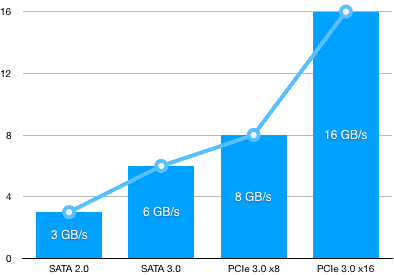
At the most basic level, both PCIe SSD and SATA SSDs provide faster storage than legacy SATA HDD. Which approach is best for a given organization, however, depends on the price vs. performance trade off and whether or not ‘good enough’ is in fact good enough for a given task.
For users that crave the fastest performance, lowest latency and aren’t overly concerned about cost, PCIe-based storage is an ideal choice. PCIe-based storage is an ideal choice for in-memory workloads and applications that are performance sensitive (including machine learning). PCIe, however, is not the best choice for large storage capacities and scalability, as many servers have more SATA ports than PCIe.
SATA-based SSDs are an ideal choice for users that don’t necessarily want to pay top-dollar for the absolute fastest storage, but still want good performance and latency characteristics. While SATA SSD can’t achieve interface speeds that are as fast as PCIe-based SSD, many everyday application usage and workloads likely won’t notice much, if any, difference.
| Interface | Key Attributes | Use-Cases |
|---|---|---|
| PCIe SSD | ● Faster interface ● Maximum performance |
● In memory application usage ● Data analytics ● Machine learning ● High performance rendering |
| SATA SSD | ● Lower cost ● Greater storage capacity and density options |
● Solid performance for everyday use-cases that don’t demand the highest levels of performance. |
| Interface | Key Attributes | Use-Cases |
|---|---|---|
| PCIe SSD | ● Faster interface ● Maximum performance |
● In memory application usage ● Data analytics ● Machine learning ● High performance rendering |
| SATA SSD | ● Lower cost ● Greater storage capacity and density options |
● Solid performance for everyday use-cases that don’t demand the highest levels of performance. |
Sean Michael Kerner is an Internet consultant, strategist, and contributor to several leading IT business web sites.

Enterprise Storage Forum offers practical information on data storage and protection from several different perspectives: hardware, software, on-premises services and cloud services. It also includes storage security and deep looks into various storage technologies, including object storage and modern parallel file systems. ESF is an ideal website for enterprise storage admins, CTOs and storage architects to reference in order to stay informed about the latest products, services and trends in the storage industry.
Property of TechnologyAdvice. © 2026 TechnologyAdvice. All Rights Reserved
Advertiser Disclosure: Some of the products that appear on this site are from companies from which TechnologyAdvice receives compensation. This compensation may impact how and where products appear on this site including, for example, the order in which they appear. TechnologyAdvice does not include all companies or all types of products available in the marketplace.